
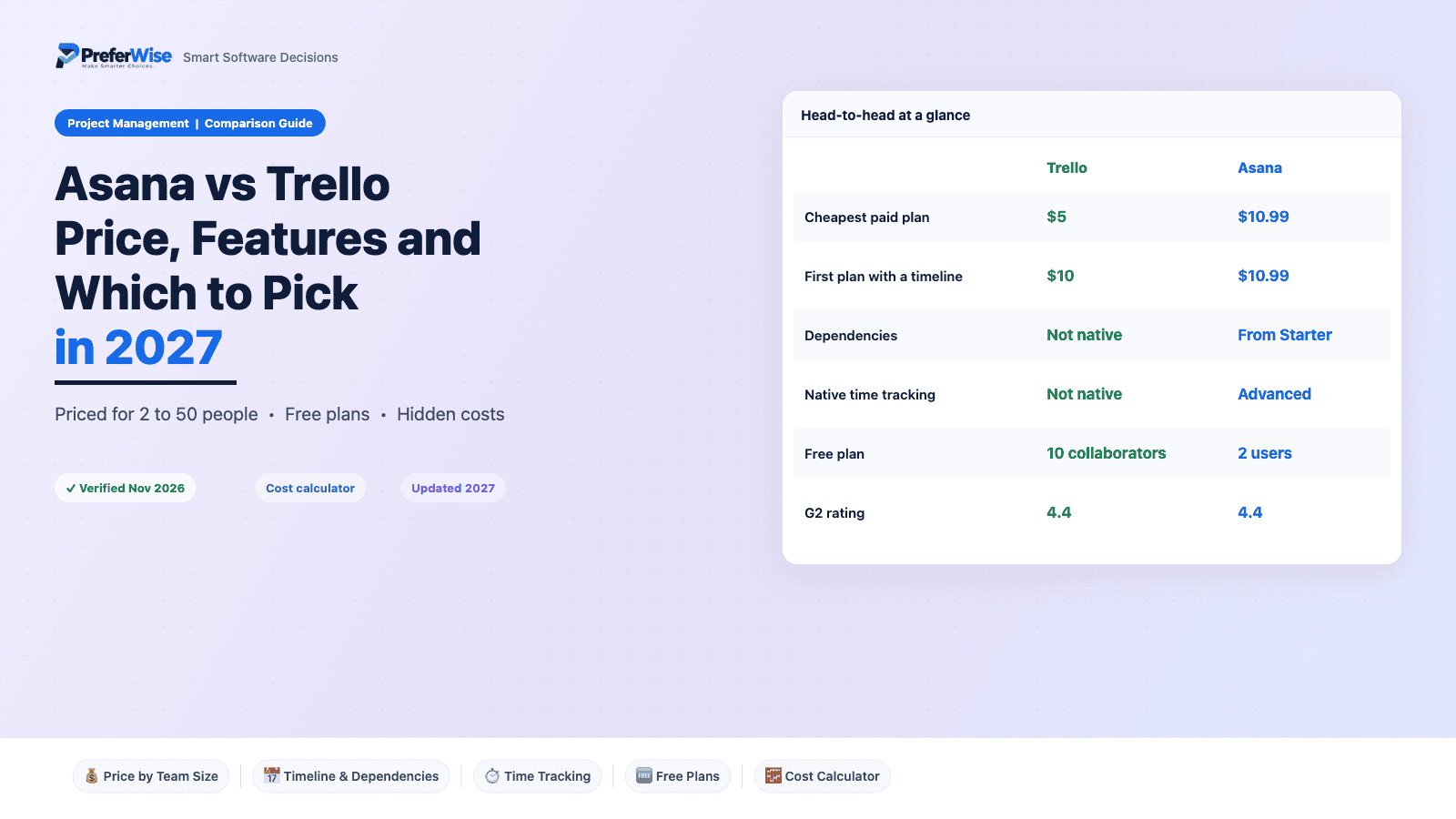
Asana vs Trello in 2027: Price, Features and Which to Pick
Asana vs Trello looks like a price fight, and the first look favors Trello: Standard costs $5 per user against $10.99 for Asana Starter. Then you add a timeline, and the gap almost vanishes. Trello Premium costs $10, and Asana Starter already includes dependencies and unlimited rules. We priced both tools for 2 to 50 people so you can see where each one wins.
Last updated: November 2026 · Written by Prasenjit · Pricing verified November 2026
The Short Answer
Trello wins on price, simplicity and its free plan for teams of 3 to 10. Asana wins once you need dependencies, time tracking, portfolios or several projects with clear owners. At 10 people, Trello Standard costs $719 a year less than Asana Starter, but Trello Premium, the first Trello plan with a timeline, costs only $119 a year less. Pick Trello if a board covers your work. Pick Asana if your work has dependencies.
Both tools sit on most shortlists. If you have not narrowed the field yet, start with our best project management software roundup. This page assumes you already picked these two. Weighing Asana against other tools instead? See ClickUp vs Asana, monday.com vs Asana or Asana alternatives. For ClickUp against monday.com, read ClickUp vs monday.com. Want more monday.com replacements? See monday.com alternatives.
Standard at $5 undercuts Asana Starter at $10.99. At 10 people that is $719 a year.
Premium at $10 is only $119 a year cheaper than Asana Starter at 10 people, so price both before you assume Trello wins.
Dependencies start on Asana Starter. Trello has none natively on any plan.
Native time tracking comes with Asana Advanced at $24.99. Trello has none natively.
G2 reviewers score its setup 92% against 89% for Asana, and ease of use 91% against 89%.
Trello Free allows 10 collaborators. Asana Personal stops at 2 users on accounts created after November 2025.
Side-by-Side Snapshot
Prices show USD per user a month on annual billing unless noted.
| Feature | Trello | Asana |
|---|---|---|
| Best for | Small teams that want a visual board with minimal training | Teams that run several projects with dependencies, owners and deadlines |
| Free plan | 10 boards, 10 collaborators, unlimited cards, 250 automation runs a month, board view only | Personal: 2 users on accounts created after Nov 2025, with list, board and calendar views |
| Cheapest paid plan | Standard: $5 per user (annual), $6 monthly | Starter: $10.99 per user (annual), $13.49 monthly |
| Mid plan | Premium: $10 per user (annual), $12.50 monthly | Advanced: $24.99 per user (annual), $30.49 monthly |
| Minimum seats | None on Standard and Premium; Enterprise needs 25 | 2 seats, then blocks of 5 above 5 users, per a published breakdown |
| Timeline or Gantt | Premium only | From Starter |
| Task dependencies | Not native on any plan | From Starter |
| Native time tracking | Not native; needs a Power-Up | Advanced only |
| Automation | 250 runs a month on Free, 1,000 on Standard, unlimited on Premium | None on Personal; described as unlimited from Starter |
| Portfolios and workload | Not available | Advanced only |
| G2 rating | 4.4 from 13,950+ reviews | 4.4 from 13,070+ reviews |
Price and Team Size
Two comparisons matter, because Trello’s cheapest plan lacks a timeline. First, the cheapest paid plan on each side: Trello Standard against Asana Starter. Second, the first plan that gives you a timeline: Trello Premium against Asana Starter. Annual billing throughout.
Cheapest paid plans: Trello Standard vs Asana Starter
| Team size | Asana seats billed | Trello Standard | Asana Starter | Gap a month | Gap a year |
|---|---|---|---|---|---|
| 2 people | 2 | $10 | $21.98 | Trello saves $11.98 | $143.76 |
| 5 people | 5 | $25 | $54.95 | Trello saves $29.95 | $359.40 |
| 7 people | 10 | $35 | $109.90 | Trello saves $74.90 | $898.80 |
| 10 people | 10 | $50 | $109.90 | Trello saves $59.90 | $718.80 |
| 25 people | 25 | $125 | $274.75 | Trello saves $149.75 | $1,797 |
| 50 people | 50 | $250 | $549.50 | Trello saves $299.50 | $3,594 |
Timeline-ready plans: Trello Premium vs Asana Starter
| Team size | Asana seats billed | Trello Premium | Asana Starter | Gap a month | Gap a year |
|---|---|---|---|---|---|
| 2 people | 2 | $20 | $21.98 | Trello saves $1.98 | $23.76 |
| 5 people | 5 | $50 | $54.95 | Trello saves $4.95 | $59.40 |
| 7 people | 10 | $70 | $109.90 | Trello saves $39.90 | $478.80 |
| 10 people | 10 | $100 | $109.90 | Trello saves $9.90 | $118.80 |
| 25 people | 25 | $250 | $274.75 | Trello saves $24.75 | $297 |
| 50 people | 50 | $500 | $549.50 | Trello saves $49.50 | $594 |
Cost calculator
Set your team size, tick what you need, and the calculator picks the cheapest plan on each tool that covers it. It then compares the bill, flags unused Asana seats, and shows the three-year cost. Where Trello cannot cover a need natively, it says so. For a full software stack, try our price estimator, or read the wider project management software pricing guide.
10 people
See all four plans at this team size
Plan Seats billed Per month Per year Trello Standard Asana Starter Trello Premium Asana Advanced
USD, annual billing. Trello bills per user with no minimum on Standard and Premium. Asana bills a 2-seat minimum, then blocks of 5 above 5 users, as a published breakdown describes. Plan limits come from published comparisons, so confirm both on the vendors’ pricing pages.
Asana vs Trello Free Plans
Trello’s free plan is the more usable one for a team. It allows 10 collaborators and 10 boards, with unlimited cards and 250 automation runs a month, and it shows boards only. Asana Personal gives more views, with List, Board and Calendar, but caps at 2 users on accounts created after November 12, 2025. Older accounts reportedly keep a legacy allowance of up to 10, so old reviews can mislead you.
A team of 3 to 10 can run real work on Trello Free. A team of 2 can use either. If you want a free tool that lasts longer, read our guide to the best free project management software.
Asana vs Trello, Feature by Feature
Both tools cover tasks, due dates, boards and calendars. Dependencies, time tracking and portfolios split them cleanly, so read those rows first.
Views
Trello: Free and Standard plans show boards only, per a published comparison. Calendar, Timeline, Table and Dashboard views need Premium.
Asana: Free includes List, Board and Calendar. Timeline starts on Starter.
Timeline and Gantt
Trello: Premium at $10 adds a Timeline view. There is no native Gantt at any price.
Asana: Timeline comes with Starter at $10.99.
Dependencies
Trello: Not native on any plan. Teams that need them usually add a Power-Up or move tools.
Asana: Dependencies come with Starter.
Automation
Trello: Butler allows 250 runs a month on Free, 1,000 on Standard and unlimited runs on Premium and Enterprise.
Asana: Personal has none. Starter and above are described as unlimited, and rules, forms and approvals sit behind paid plans.
Custom fields, forms and approvals
Trello: Custom fields start on Standard. Forms need a Power-Up and there are no approval workflows.
Asana: Custom fields and forms come with Starter. Approvals need Advanced.
Time tracking
Trello: Not native. Teams add a third-party Power-Up, which can carry its own fee.
Asana: Native time tracking sits on Advanced at $24.99.
Reporting, goals and portfolios
Trello: A Dashboard view on Premium offers basic charts. There are no goals, portfolios or workload views.
Asana: Starter has Reporting Lite. Advanced adds Goals, Portfolios, Workload and advanced reporting.
AI features
Trello: AI assistance starts on Premium, per published breakdowns.
Asana: AI features run on credits. Published figures put 50,000 credits a month on Starter and 75,000 on Advanced, per billing account, so check the live page.
Integrations
Trello: Around 200 Power-Ups, according to a published comparison. Strong with Atlassian tools such as Jira and Confluence.
Asana: Around 400 integrations, including Salesforce, Tableau and Power BI on higher plans.
Three Questions That Settle It
Does your work have dependencies?
If one task cannot start until another finishes, you need dependencies, and Trello does not offer them natively on any plan. Asana includes them from Starter at $10.99. If your work is a flow of cards from To Do to Done, skip this row and take Trello.
Do you need time tracking or portfolio views?
Native time tracking, Goals, Portfolios and Workload all sit on Asana Advanced at $24.99. For 10 people that is $249.90 a month, so price it before you fall for the feature list. Trello has none of these natively. A third-party Power-Up can add time tracking, and some Power-Ups carry their own fee.
How many people will use it?
Headcount moves the bill more than any feature. Trello bills per user, so seven people cost seven seats. A published breakdown says Asana bills 2 seats minimum, then blocks of 5 above 5 users. A team of 7 then pays for 10 seats. Run both numbers for your exact count before you compare plans.
Asana vs Trello Ratings and Ease of Use
G2 gives both tools 4.4 out of 5 across about 13,000 reviews each. Trello leads on ease of use and setup by two to three points, and the two tie on ease of doing business with. Use the gaps as tie-breakers.
| G2 measure | Trello | Asana |
|---|---|---|
| Overall rating | 4.4 / 5 | 4.4 / 5 |
| Review count | 13,950+ | 13,070+ |
| Ease of use | 91% | 89% |
| Ease of setup | 92% | 89% |
| Ease of doing business with | 90% | 90% |
The scores match what you would expect from the designs. A board of cards needs little training, and Asana asks you to learn projects, sections and owners. A 3-point setup gap sounds small. In practice it shows up as extra days before everyone uses the tool daily. G2’s own testing article, written by a reviewer who tested both on the same workflows, backs the pattern: Trello suits solo users and small teams with simple projects, and Asana suits teams that run several projects with dependencies and clear ownership.
Hidden Costs
These items rarely show up on pricing pages and show up on invoices. Check them before you sign, and screenshot the page you buy from.
Asana: seat blocks
A published breakdown says Asana Starter and Advanced bill 2 seats minimum, then blocks of 5 above 5 users. A team of 6 pays for 10 seats. We priced it that way, so confirm your exact count at checkout.
Asana: the free plan shrank
Accounts created on or after November 12, 2025 get 2 users on Personal. Older accounts reportedly keep a legacy allowance of up to 10. Old reviews that praise the free plan describe the earlier limit.
Asana: time tracking needs Advanced
Native time tracking sits on Advanced at $24.99. A 10-person team pays $249.90 a month for it, against $109.90 for Starter.
Asana: AI credits
AI features use credits shared across the billing account, and published figures list add-on tiers that start at $150 a month. Budget from the live page if you plan heavy AI use.
Asana: monthly billing premium
Starter costs $13.49 monthly against $10.99 annually. For 10 people that adds $300 a year. Seat reductions generally take effect only at renewal on annual plans.
Trello: Power-Ups and automation caps
Free allows 250 automation runs a month and Standard allows 1,000. Heavy automation needs Premium. Some Power-Ups carry separate fees, which matters if you add time tracking or forms.
Trello: Enterprise needs 25 seats
Enterprise costs $17.50 per user on annual billing and starts at 25 users, according to a published comparison. SAML single sign-on on lower plans needs a separate Atlassian Guard subscription from about $4 per user.
Both: public sentiment beyond G2
G2 scores are close, but Trustpilot ratings differ. One comparison reports 2.7 out of 5 for Trello and 1.5 for Asana, linking Asana complaints mainly to billing and cancellation. Trustpilot skews toward unhappy customers, so treat it as a prompt to check billing terms, not a verdict.
Each Tool in Brief
Trello in brief
Trello keeps work on a board of lists and cards, and most people grasp it in minutes. G2 reviewers rate ease of use at 91% and ease of setup at 92%. It stays cheap, with paid plans from $5. The trade-off shows up when projects grow: no native dependencies, no native time tracking and thin reporting.
Good
- Lowest per-seat price: $5 on Standard, $10 on Premium
- Free plan with 10 collaborators and 10 boards
- Highest G2 ease-of-setup score of the two (92%)
- No seat minimum on Standard and Premium
Watch out
- No native dependencies or time tracking on any plan
- Timeline needs Premium, and there is no native Gantt
- Automation caps at 250 and 1,000 runs a month on lower plans
- Reporting stays basic as teams grow
Asana in brief
Asana organizes work into projects, tasks, owners and deadlines, with Timeline, dependencies and rules from its first paid plan. Advanced adds portfolios, workload and time tracking. It costs more than Trello at the entry level, and the free plan shrank for new accounts in November 2025.
Good
- Dependencies, Timeline and unlimited rules from Starter at $10.99
- Portfolios, Workload and time tracking on Advanced
- Stronger fit for multiple projects with clear ownership
- About 400 integrations
Watch out
- Costs more than Trello at the entry level
- Free plan limited to 2 users on newer accounts
- Seat blocks above 5 users can leave unused seats on the bill
- Advanced at $24.99 is the price of time tracking
Which to Pick
A 2-person team with simple tasks
Asana Personal covers 2 users with List, Board and Calendar views at no cost. Trello Standard costs $10 a month for 2. Start with Asana Personal and move up only when you hit its limits.
A 5-person team that wants a clean board
Trello Standard at $25 a month, against $54.95 for Asana Starter. Pick Trello and save $359.40 a year.
A 7-person team that needs a timeline
Trello Premium at $70 a month. Asana Starter bills 10 seats for $109.90. Trello costs $479 less a year here, and it lacks dependencies.
A 10-person team that needs dependencies
Asana Starter at $109.90 a month. Trello cannot do native dependencies at any price, so the choice makes itself.
A team that bills clients by the hour
Asana Advanced at $249.90 a month for 10 people, with native time tracking. On Trello you would add a third-party Power-Up, which carries its own fee.
A 25-person team that wants portfolio views
Asana Advanced at $624.75 a month, which is $7,497 a year. Trello has no portfolio or workload views. Test Asana on one real project first.
Switching Between Asana and Trello
Moving between them costs more than the price gap suggests, mostly in lost automations, Power-Ups and attachments. Check each vendor’s import options for boards, cards and attachments, and expect to rebuild automations by hand. Import one pilot project first and check that due dates, assignees and files arrive intact. Keep the old tool on monthly billing until your team stops opening it, then cancel.
Frequently Asked Questions
Sources
- Trello pricing (vendor page; prices as in our pricing guide, November 2026)
- Asana pricing (vendor page; prices as in our pricing guide, November 2026)
- G2: I Tested Trello vs. Asana (ratings, review counts and category scores; the author reports hands-on testing, March 2026)
- Agiled: Trello vs Asana (plan gating, automation caps and sentiment figures; a competing vendor wrote it, April 2026)
- Agiled: Asana pricing (seat rules, free-plan change and AI credits; a competing vendor wrote it, May 2026, and it contains some internal inconsistencies, so we used it for seat rules only)
- eesel AI: Trello pricing (free-plan limits and Power-Up costs; published September 2025, so we cross-checked it)
- The Digital Project Manager: Asana vs Trello (positioning and who each tool suits, November 2026)
Prices and limits change frequently. Confirm the current details on each vendor’s site before you buy. Browse more guides in the Project Management Software category.
