
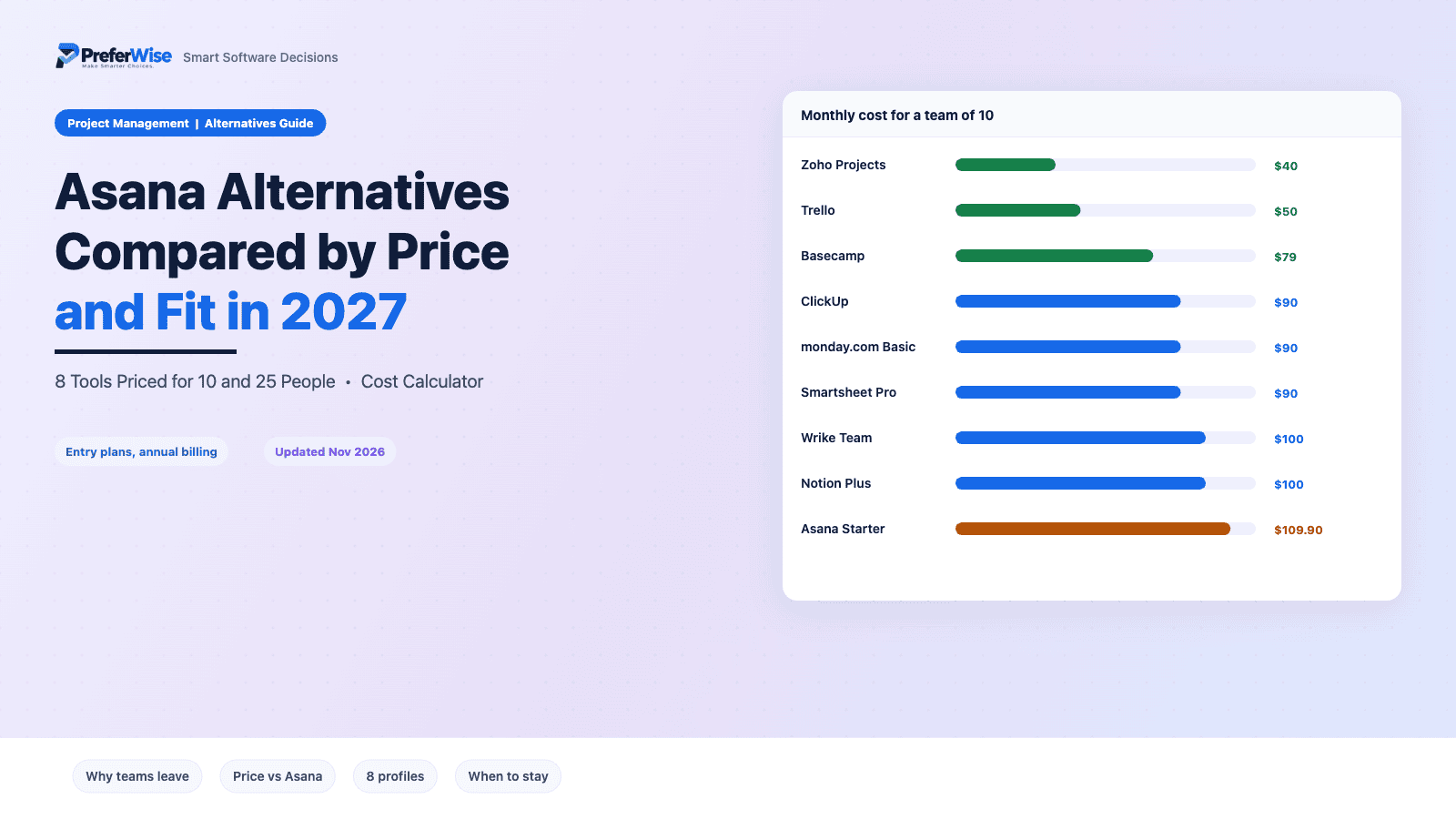
Asana Alternatives in 2027: 8 Options Compared by Price and Fit
Most people who search for an Asana alternative want one of three things: a lower bill, a simpler tool, or features Asana locks behind its $24.99 plan. Each of the eight tools below fixes one of those. Some fix none, and a few cost more than Asana at 25 people, so we priced every one for teams of 10 and 25 before ranking them.
Last updated: November 2026 · Written by Prasenjit · Pricing verified November 2026
The Short Answer
Pick ClickUp if you want more features for less money and have someone to set it up. Pick Trello if Asana feels like too much tool. Pick Zoho Projects if price leads. Do not leave Asana for monday.com Standard, Notion, Smartsheet, Wrike or Basecamp to save money: at 25 people several of them cost more.
Premium costs $4 per user, and 10 people pay $40 a month against $109.90 on Asana Starter.
A board and cards. A team that never used a project tool starts the same afternoon, for $5 per user.
Core costs $9 and adds custom fields, forms, goals and docs. Setup takes real time.
Readers grasp boards at a glance. Price Standard, not Basic, because Gantt starts there.
Wikis, briefs and task databases in one workspace, for teams that write more than they schedule.
$79 a month covers up to 10 people. Beyond 10, Pro Unlimited costs $329.
Why Teams Leave Asana
Asana is a well-liked product, with thousands of positive reviews on G2 and Capterra. Reviewers who do complain repeat the same five themes. These counts come from G2’s pros and cons summary, so read them as patterns, not as a verdict on how most users feel.
| Complaint | G2 mentions | Alternatives that help |
|---|---|---|
| Steep learning curve | 260 | Trello, monday.com |
| Key features behind paywall | 164 | ClickUp, Zoho Projects |
| Excessive notifications | 163 | Fix in settings first; any tool has the same problem |
| Overwhelming in daily use | 158 | Trello, Basecamp |
| High per-seat cost | 128 | Zoho Projects, Trello, ClickUp |
Notifications deserve a separate note. Reviewers on both sites say Asana sends too many emails, and every tool on this list has the same problem once a team grows. Audit your notification settings before you switch. It costs nothing and fixes more switching-worthy irritation than most migrations.
Pricing and paywalls are the stronger reasons to move. Native time tracking, portfolios, goals and approvals all start on Advanced at $24.99. Asana’s free plan covers 2 users. If those limits bother you, one of the tools below probably fits better. For a wider view, read our best project management software roundup.
The 8 Alternatives at a Glance
Prices show USD per user a month on annual billing, for each tool’s entry plan.
| Tool | Entry plan | Free option | Gantt | Best for |
|---|---|---|---|---|
| ClickUp | $9 | Unlimited members, 60 MB storage | Paid plans | Teams that want more features per dollar |
| monday.com | $9 Basic, $12 Standard | Free plan, 2 users | Standard and up | Visual boards and fast onboarding |
| Trello | $5 | Up to 10 collaborators | No native Gantt | Small teams that want boards only |
| Zoho Projects | $4 | 5 users, 3 projects | Included | Lowest price, billable hours |
| Notion | $10 | Free plan, 5 MB upload cap | No native Gantt | Teams that write more than they schedule |
| Smartsheet | $9 Pro, $19 Business | None | Included | Spreadsheet-minded ops and finance teams |
| Wrike | $10 Team, $25 Business | Free tier available | Included on Team | Teams that will pass 15 people |
| Basecamp | $79 flat, $329 unlimited | None (30-day trial) | No Gantt | Teams of 8 to 10 that hate per-seat billing |
Price Against Asana
Per-user prices mislead because tools bill differently. Basecamp charges per account, Smartsheet and Wrike jump a tier at fixed headcounts, and monday.com’s cheap plan lacks Gantt. These tables compare each tool’s entry plan with Asana Starter at $10.99 (annual billing).
10 people
| Tool | Monthly cost | Against Asana | Yearly cost |
|---|---|---|---|
| Asana Starter (baseline) | $109.90 | Baseline | $1,318.80 |
| Zoho Projects | $40 | Saves $69.90 | $480 |
| Trello | $50 | Saves $59.90 | $600 |
| Basecamp | $79 | Saves $30.90 | $948 |
| ClickUp | $90 | Saves $19.90 | $1,080 |
| monday.com (Basic) | $90 | Saves $19.90 | $1,080 |
| Smartsheet | $90 | Saves $19.90 | $1,080 |
| Wrike | $100 | Saves $9.90 | $1,200 |
| Notion | $100 | Saves $9.90 | $1,200 |
25 people
| Tool | Monthly cost | Against Asana | Yearly cost |
|---|---|---|---|
| Asana Starter (baseline) | $274.75 | Baseline | $3,297 |
| Zoho Projects | $100 | Saves $174.75 | $1,200 |
| Trello | $125 | Saves $149.75 | $1,500 |
| ClickUp | $225 | Saves $49.75 | $2,700 |
| monday.com (Basic) | $225 | Saves $49.75 | $2,700 |
| Notion | $250 | Saves $24.75 | $3,000 |
| Basecamp | $329 | Costs $54.25 more | $3,948 |
| Smartsheet | $475 | Costs $200.25 more | $5,700 |
| Wrike | $625 | Costs $350.25 more | $7,500 |
Cost calculator
Move the slider to your team size. Rows sort from cheapest to most expensive. For a wider cost comparison, see our project management software pricing guide.
| Tool | Monthly cost | Against Asana | Yearly cost |
|---|
USD, annual billing, entry plans. Smartsheet Pro covers 1 to 10 members and Business starts at 11. Wrike Team covers up to 15 users. Basecamp bills $79 a month for up to 10 users and $329 beyond.
The 8 Alternatives
ClickUp
ClickUp suits teams that like how Asana structures work but want more for less. Core costs $9 against $10.99 and adds custom fields, forms, goals and 1,000 automation runs a month. The catch: you build your own system. Give one person a week to shape the workspace before anyone else logs in.
Good
- Cheaper than Asana Starter at every size, by $1.99 per person
- Docs, goals, forms and time tracking inside one workspace
- Free plan accepts unlimited members
Watch out
- Free plan caps storage at 60 MB
- Promo prices of $9 and $17 sit beside list prices of $12 and $25
- Test guest billing before inviting clients
monday.com
monday.com wins converts through clarity. Boards read at a glance and non-technical staff need little training, which answers Asana’s biggest complaint. Price the right plan, though. Basic at $9 lacks Gantt and guest access, so most teams land on Standard at $12, which costs more than Asana Starter at $10.99.
Good
- Quick for non-technical teams to adopt
- Standard adds Timeline, Gantt, calendar view and guest access
- Pro adds time tracking and private boards
Watch out
- Basic lacks Gantt and guest access
- Standard caps automation and integration actions at 250 each a month
- Standard costs more than Asana Starter
Trello
Trello is a board with cards, and for many teams that is enough. Standard costs $5 per user and the free plan covers up to 10 collaborators, so costs stay low. Teams that outgrow it usually hit dependencies and reporting first.
Good
- Half the price of Asana Starter
- Teams learn it in an afternoon
- Capture tasks from email, Slack and Teams
Watch out
- No native Gantt
- Reporting and dependencies lag behind Asana
- Premium at $10 unlocks extra views
Zoho Projects
Zoho Projects costs $4 per user on annual billing, the lowest paid entry here, and still includes Gantt, budgets and timesheets with approvals. Service businesses that bill hours get the most from it. Judge the interface in a trial before you commit.
Good
- Cheapest paid plan on this list
- Budgets and timesheets with approvals on Premium
- Free plan covers 5 users
Watch out
- Free plan stops at 3 projects
- Critical path and baselines need Enterprise
- Zoho shows local-currency prices, so check your region
Notion
Notion works as a project tool because you build it into one. Docs, wikis and task databases share one workspace, which suits teams that write constantly. Plus costs $10, only 99 cents less than Asana Starter, so switch for the workflow, not for savings.
Good
- Docs, wiki and tasks in one workspace
- Plus adds unlimited guests
- Templates cover lightweight project tracking
Watch out
- No native Gantt or workload view
- Free plan caps uploads at 5 MB
- Without a champion, pages scatter
Smartsheet
Smartsheet reads like a spreadsheet that learned project management, which suits ops, finance and facilities teams. Pro costs $9 for 1 to 10 members, but member 11 forces Business at $19. Contributors cost nothing on any plan.
Good
- Grid layout feels familiar to spreadsheet users
- Free contributors on every plan
- Gantt available
Watch out
- No free plan
- Member 11 lifts a team of 10 from $90 to $209 a month
- Pro caps automated triggers at 250 a month
Wrike
Wrike makes sense for teams that expect to outgrow small tools. Team costs $10 per user for 2 to 15 users and includes Gantt charts. Business at $25 adds approvals, proofing and time tracking, sells annually only and requires 5 users.
Good
- Team includes Gantt at $10
- Business adds approvals and proofing
- Scales to hundreds of users
Watch out
- User 16 pushes you onto Business at $25
- Business has a 5-user minimum
- Team limits automation to 50 actions per user a month
Basecamp
Basecamp bills per account, not per person. Pro costs $79 a month for up to 10 users, and Pro Unlimited costs $329 with no cap. Messages, chat, to-dos and schedules share one project space, so teams that want less tool and more conversation like it.
Good
- Adding a person never changes the invoice
- Message boards, chat and card tables in every project
- 30-day free trial
Watch out
- Pro allows 8 active projects at a time
- At 3 users, $79 works out to about $26 each
- No Gantt or dependency tooling
When to Stay on Asana
Sometimes the right move is no move. Stay put in these cases:
- Clients or freelancers touch your projects. Starter includes unlimited free guests, which remains one of its best features. Few alternatives match that without extra cost or extra testing.
- Your team already uses it daily. Teams that adopted Asana rarely get the savings back after a migration, once you count lost custom fields and retraining time.
- You need approvals, proofing and portfolios in one plan. Advanced costs more than most alternatives, but it packages those features cleanly.
- The real problem is notifications. Fix that in your settings first. No competitor solves it better.
Switching From Asana
Migration costs more than the price gap suggests, mostly in lost custom fields, comments and attachments. Export your projects (Asana supports CSV export), import one pilot project into the new tool, and check that due dates, assignees and files arrive intact. Run both tools in parallel for a few weeks and keep Asana on monthly billing until your team stops opening it. Then cancel.
Frequently Asked Questions
Sources
- Asana pricing (vendor page, read November 2026)
- G2: Asana reviews (14,126 reviews, complaint counts from the pros and cons summary)
- Capterra: Asana reviews (review themes)
- monday.com pricing (vendor page, read November 2026)
- ClickUp pricing (vendor page, prices as in our pricing guide)
- Trello pricing (vendor page, read November 2026)
- Basecamp pricing (vendor page, read November 2026)
- Zoho Projects pricing tracker (USD prices, verified October 2026)
- Notion pricing tracker (prices read October 2026)
- Smartsheet pricing tracker (verified October 2026)
- Wrike pricing tracker (verified May 2026; Wrike changed top-tier pricing in February 2026)
Prices and limits change frequently. Confirm the current details on each vendor’s site before you buy. Browse more guides in the Project Management Software category.
