
monday.com vs Asana in 2027: Price, Features and Which to Pick
Most comparisons of these two stop at “boards or lists?” Money and seat rules decide it more often. monday.com asks for 3 seats minimum and sells seats in blocks. Asana puts time tracking behind a $24.99 plan. Both facts change the bill by hundreds of dollars a year, so we priced each tool for 3 to 50 people before we compared anything else.
Last updated: November 2026 · Written by Prasenjit · Pricing verified November 2026
The Short Answer
Asana wins at entry level, for small teams and for client work. monday.com wins on feel and, for block-friendly team sizes, on the growth tier. At 10 people, Asana Starter costs $121 a year less than monday.com Standard. Asana Advanced then costs $719 a year more than monday.com Pro. Pick by the features you need in 12 months, not by the banner price.
Both tools sit near the top of most shortlists. If you have not narrowed the field yet, start with our best project management software roundup. This page assumes you already picked these two. Weighing Asana against a cheaper option instead? See our ClickUp vs Asana comparison.
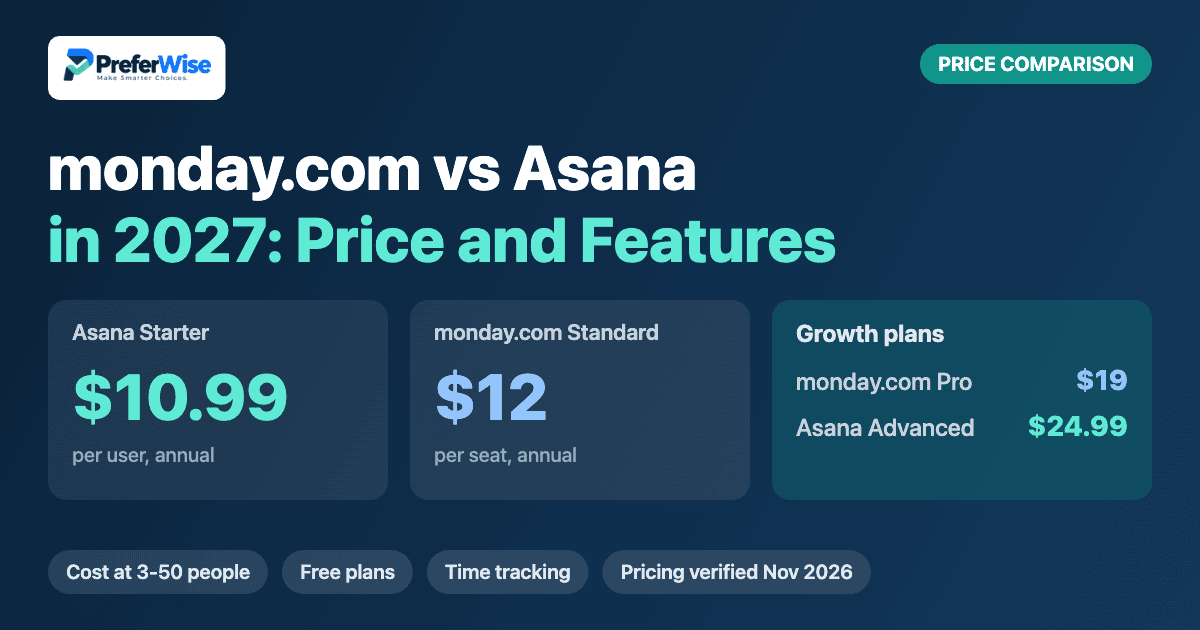
Starter at $10.99 includes Timeline and unlimited free guests. monday.com Standard, its first plan with both, costs $12 and bills in seat blocks.
Pro at $19 adds time tracking and dependencies. Asana Advanced costs $24.99. At 10 people that saves $719 a year.
G2 reviewers score its ease of use 9.0 against 8.6 for Asana, and it has the higher overall rating, 4.7 against 4.4.
Starter includes unlimited free guests. monday.com guest access starts on Standard.
Asana needs 2 seats. monday.com needs 3 on every paid plan, so a pair pays for a seat nobody uses.
Advanced bundles portfolios, goals and workload. monday.com leans on dashboards, so check dashboard limits on your plan.
Side-by-Side Snapshot
Prices show USD per user a month on annual billing unless noted.
| Feature | monday.com | Asana |
|---|---|---|
| Best for | Teams that want visual boards that non-technical people grasp quickly | Teams that want clear task ownership, guests and cross-project reporting |
| Free plan | 2 seats, 3 boards, table and Kanban views only | Personal: 2 users, list, board and calendar views, 100+ integrations |
| Entry plan | Basic: $9 per seat; Standard: $12 (annual billing) | Starter: $10.99 per user (annual), $13.49 monthly |
| Growth plan | Pro: $19 per seat (annual billing) | Advanced: $24.99 per user (annual), $30.49 monthly |
| Minimum seats | 3 on every paid plan, sold in blocks | 2 on Starter and Advanced |
| Timeline or Gantt | Standard and up | Starter and up |
| Native time tracking | Pro | Advanced |
| Guests | Guest access starts on Standard | Unlimited free guests from Starter |
| G2 rating | 4.7 from 17,144 reviews | 4.4 from 13,867 reviews |
Price and Team Size
Per-seat prices hide the real gap, because monday.com bills seat blocks and Asana bills seat by seat. These tables compare like with like: monday.com Standard against Asana Starter (both include Gantt-style views and guest access), then monday.com Pro against Asana Advanced (both include time tracking). Annual billing throughout.
Entry plans: monday.com Standard vs Asana Starter
| Team size | monday.com seats billed | monday.com Standard | Asana Starter | Gap a month | Gap a year |
|---|---|---|---|---|---|
| 3 people | 3 | $36 | $32.97 | Asana saves $3.03 | $36.36 |
| 5 people | 5 | $60 | $54.95 | Asana saves $5.05 | $60.60 |
| 7 people | 10 | $120 | $76.93 | Asana saves $43.07 | $516.84 |
| 10 people | 10 | $120 | $109.90 | Asana saves $10.10 | $121.20 |
| 25 people | 25 | $300 | $274.75 | Asana saves $25.25 | $303 |
| 50 people | 50 | $600 | $549.50 | Asana saves $50.50 | $606 |
Growth plans: monday.com Pro vs Asana Advanced
| Team size | monday.com seats billed | monday.com Pro | Asana Advanced | Gap a month | Gap a year |
|---|---|---|---|---|---|
| 3 people | 3 | $57 | $74.97 | monday.com saves $17.97 | $215.64 |
| 5 people | 5 | $95 | $124.95 | monday.com saves $29.95 | $359.40 |
| 7 people | 10 | $190 | $174.93 | Asana saves $15.07 | $180.84 |
| 10 people | 10 | $190 | $249.90 | monday.com saves $59.90 | $718.80 |
| 25 people | 25 | $475 | $624.75 | monday.com saves $149.75 | $1,797 |
| 50 people | 50 | $950 | $1,249.50 | monday.com saves $299.50 | $3,594 |
Cost calculator
Move the slider to your team size. For a full software stack, try our price estimator, or read the wider project management software pricing guide.
| Plan | Seats billed | Per month | Per year |
|---|---|---|---|
| Asana Starter | |||
| monday.com Standard | |||
| Asana Advanced | |||
| monday.com Pro |
USD, annual billing. Asana bills a minimum of 2 seats. monday.com bills a minimum of 3 seats, then blocks of 5 and 10, then steps of five, as published comparisons describe.
Free Plans
Treat both free plans as trials. monday.com gives 2 seats and 3 boards, with table and Kanban views only and no automations or integrations. Asana Personal also stops at 2 users, and it adds list, board and calendar views with 100+ integrations. Any team of three or more hits the wall on day one.
Two freelancers sharing a project can live on either one. A five-person team will outgrow both inside a month. If you need a free tool that lasts longer, read our guide to the best free project management software.
Feature by Feature
Most gaps matter less than they look, because both tools cover the basics: tasks, subtasks, boards, calendars and automations. Where time tracking starts and how each tool handles guests change real decisions, so read those rows first.
Views and Gantt
monday.com: Free plan stops at table and Kanban views. Timeline and Calendar start on Standard at $12.
Asana: Personal gives list, board and calendar. Timeline, Asana’s Gantt-style view, starts on Starter at $10.99.
Automations
monday.com: Basic includes none. Standard allows 250 automation actions and 250 integration actions a month, and Pro raises both to 25,000.
Asana: Starter includes unlimited automations, forms and dependencies, according to published plan breakdowns.
Dependencies
monday.com: Dependency columns sit on Pro at $19.
Asana: Dependencies come with Starter at $10.99.
Time tracking
monday.com: Native time tracking starts on Pro at $19.
Asana: Native time tracking needs Advanced at $24.99. A Timesheets and Budgets add-on costs extra on paid plans.
Guests and clients
monday.com: Guest access starts on Standard. Basic users cannot invite outside collaborators.
Asana: Starter includes unlimited free guests, which suits agencies and client work.
Reporting and goals
monday.com: Dashboards pull data from several boards. Plan limits vary, so read the dashboard row on the pricing page before you rely on them.
Asana: Dashboards start on Starter. Portfolios, goals, workload and Universal Reporting need Advanced.
Three Questions That Settle It
How many people will use it?
Team size drives the monday.com bill more than any feature. Teams of 3, 5, 10, 15, 25 and 50 fit the blocks. A team of 7 pays for 10 seats, so you carry 3 empty ones. Asana bills closer to headcount. If your team sits just above a block, run both numbers before you fall for the monday.com design.
Do clients or freelancers touch your projects?
Take an agency with 10 staff and 6 clients who comment on deliverables. Asana Starter handles that for $109.90 a month, because Starter includes unlimited free guests. monday.com guest access begins on Standard, which costs $120 for the same 10 seats, and you should confirm how guests count on your plan before you invite clients.
Will you need time tracking or portfolios?
Time tracking sits on monday.com Pro ($19) and Asana Advanced ($24.99). For 10 people that is $190 against $249.90 a month, a $718.80 yearly gap in monday.com’s favor. If you also need Asana’s portfolios and goals, Advanced packages them together. If your needs stop at tasks, timelines and some automation, Asana Starter at $109.90 beats monday.com Standard at $120 for 10 people.
Ratings and Ease of Use
G2 shows monday.com ahead on every score we checked, across 17,144 reviews against 13,867 for Asana. The gaps are small, so use them as tie-breakers.
| G2 measure | monday.com | Asana |
|---|---|---|
| Overall rating | 4.7 / 5 | 4.4 / 5 |
| Ease of use | 9.0 | 8.6 |
| Ease of setup | 8.8 | 8.6 |
| Ease of admin | 9.0 | 8.7 |
| Quality of support | 8.9 | 8.5 |
| Meets requirements | 9.0 | 8.7 |
Reviewers praise monday.com for intuitive day-to-day use (1,318 mentions) and customizable boards and workflows (802). They praise Asana for easy daily use (770) and organized tasks and projects (476). Complaints overlap: both draw steep learning curve comments (217 for monday.com, 252 for Asana). Asana also draws 163 mentions of key features behind a paywall, and monday.com draws 172 mentions of slow board loading. Counts come from G2’s pros and cons summary, and monday.com has more reviews, so compare the pattern, not the totals.
Hidden Costs
These items rarely show up on pricing pages and show up on invoices. Check them before you sign, and screenshot the page you buy from.
monday.com: the 3-seat minimum
Every paid plan starts at 3 seats. A 2-person team pays $36 a month on Standard, against $21.98 for 2 seats of Asana Starter.
monday.com: seat blocks
Published breakdowns say seats come in blocks: 3, 5, 10, then steps of five. We priced that way. A team of 7 pays for 10 seats ($120 a month on Standard), and a team of 12 pays for 15 ($180). Check your exact count at checkout.
monday.com: Basic is not the real entry plan
Basic at $9 lacks Gantt, guest access and automations. Price Standard at $12 for a fair comparison with Asana Starter.
monday.com: automation caps
Standard allows 250 automation actions and 250 integration actions a month. Count the rules you plan to run before you decide Standard is enough.
Asana: the Advanced jump
Time tracking, portfolios, goals, workload and proofing all sit on Advanced. Moving from Starter to Advanced raises a 10-person bill from $109.90 to $249.90 a month.
Asana: 2-seat minimum
A competing site reports that the 2-seat minimum on Starter surfaces late in checkout. A solo user should plan on the free Personal plan or pay for 2 seats.
Asana: add-ons and SSO
Timesheets and Budgets cost extra on paid plans, and SAML SSO needs Enterprise, which has no public price.
Both: monthly billing
Asana Starter costs $13.49 monthly against $10.99 annually, a 23 percent premium that adds $300 a year for 10 people. monday.com also charges more for monthly billing, so compare plans on the same cycle.
Each Tool in Brief
monday.com in brief
monday.com turns work into color-coded boards that people read at a glance. Reviewers on G2 give it the higher overall score and the higher ease-of-use score, and that shows when you roll it out to non-technical staff. The money side needs a closer look: three seats minimum, seats sold in blocks, and Standard as the real entry plan.
Good
- Higher G2 scores on ease of use (9.0), support (8.9) and overall rating (4.7)
- Pro at $19 undercuts Asana Advanced by $5.99 per seat and includes time tracking and dependencies
- Customizable boards and workflows rank among the most praised features on G2 (802 mentions)
- Pro allows 25,000 automation and integration actions a month
Watch out
- 3-seat minimum on every paid plan, so a team of 2 pays for 3
- Seat blocks inflate the bill: a team of 7 pays for 10 seats on Standard
- Basic lacks Gantt and guests, so most teams land on Standard at $12
- G2 reviewers mention slow board loading (172 mentions)
Asana in brief
Asana sticks to tasks, owners and due dates, and it handles them cleanly. Starter adds Timeline, dependencies, unlimited automations and unlimited free guests for $10.99, which makes it the cheaper entry point. Time tracking, portfolios and goals all wait on the $24.99 Advanced plan, and that jump decides the budget.
Good
- Cheaper entry plan: $10.99 includes Timeline, dependencies and automations
- Unlimited free guests from Starter
- Seats bill one at a time on small teams, with a 2-seat minimum
- Advanced bundles portfolios, goals, workload and proofing
Watch out
- Advanced costs $24.99, which is $5.99 more than monday.com Pro
- Time tracking needs Advanced
- G2 reviewers cite a steep learning curve (252 mentions) and paywalled features (163)
- Free plan stops at 2 users
Which to Pick
A 12-person marketing agency with clients who comment on work
Asana Starter at $131.88 a month. Free guests cover the clients, and monday.com Standard bills 15 seats, which costs $180.
A 10-person ops team that needs time tracking and dependencies
monday.com Pro at $190 a month against $249.90 for Asana Advanced. This is the monday.com sweet spot: a block-friendly headcount and a feature that sits on Asana’s expensive plan.
A 7-person team that needs time tracking
Asana Advanced at $174.93 a month. monday.com Pro bills 10 seats and costs $190, so the seat block wipes out its price edge.
A 2-person studio
Asana. The free plan works for two people, and paid Starter costs $21.98 against $36 for monday.com Standard.
A team that struggles to get adoption
monday.com. Higher G2 ease-of-use scores and visual boards make it easier to sell internally. Back that up with a pilot, not a score.
A 25-person team that wants portfolio reporting
Asana Advanced, if goals and portfolios matter more than price. If dashboards cover your reporting, monday.com Pro costs $475 a month against $624.75.
Switching Between Them
Moving between them costs more than the price gap suggests, mostly in lost custom fields and attachments. Import one pilot project first and check that due dates, assignees, custom fields and files arrive intact. Keep the old tool on monthly billing until your team stops opening it, then cancel. Looking beyond these two? Our Asana alternatives guide compares more options.
Frequently Asked Questions
Sources
- Asana pricing (vendor page, read November 2026)
- monday.com pricing (vendor page, read November 2026)
- G2: Asana vs monday.com (ratings, category scores and pros and cons counts, read November 2026)
- Agiled: Asana vs monday.com (seat minimums, plan gating and seat blocks; a competing vendor wrote it, April 2026)
- Cut the SaaS: Asana vs Monday (plan prices and free plan limits, June 2026)
Prices and limits change frequently. Confirm the current details on each vendor’s site before you buy. Browse more guides in the Project Management Software category.
