
Best Project Management Software for Small Business in 2027
Most project management software for small business looks cheap until the plan you need costs twice the price on the pricing page. We compared 9 tools on what small teams pay at 5, 10 and 25 people, which features sit behind which plan, and which user caps force an upgrade. Start with the picks, then use the cost calculator.
Last updated: November 2026 · Written by Prasenjit · Pricing verified November 2026
The Quick Answer
Pick ClickUp if someone on your team enjoys setting tools up, and Trello if nobody does. Asana Starter suits teams that work with clients. Zoho Projects costs least. Whatever you choose, check user caps first: Smartsheet Pro stops at 10 members and Wrike Team stops at 15 users.
Running a small business means one person often manages projects, clients and half the operations. That changes what you need from a tool. You want fast setup, predictable billing and no surprise upgrade when the team hits 11 people. If you only need a $0 option, start with our best free project management software guide. For a broader list that includes enterprise tools, see our best project management software roundup, or browse everything in the Project Management Software category.
Our Picks by Situation
Core at $9 includes unlimited storage, custom fields, forms and 1,000 automations a month.
Boards need no training, and Standard costs $5 per user.
Starter includes Gantt, forms and unlimited free guests for $10.99.
Premium costs $4 per user on annual billing, with unlimited projects.
Clear boards; Gantt and guest access start on Standard at $12.
$79 a month covers up to 10 people with no per-user fees.
Comparison Table
Search or filter below. Prices show each tool’s cheapest paid plan on annual billing.
| Tool | Best for | Cheapest paid plan | Free plan | Gantt starts at | Watch out for |
|---|---|---|---|---|---|
| ClickUp | Most features per dollar | $9 (Core) | Yes: 60 MB storage | Check plan details | Setup time |
| monday.com | Visual, non-technical teams | $9 (Basic) | Yes: 2 seats | Standard, $12 | Gantt and guests need Standard |
| Asana | Client-facing teams | $10.99 (Starter) | Yes: 2 users | Starter, $10.99 | Advanced jumps to $24.99 |
| Trello | Simplest adoption | $5 (Standard) | Yes: 10 collaborators, 10 boards | Not a Gantt tool | Board-first |
| Zoho Projects | Lowest paid price | $4 (Premium) | Yes: 5 users, 3 projects | Check plan details | Value peaks in Zoho ecosystem |
| Basecamp | Flat-fee budgets | $79/mo flat (Pro) | Yes: 1 project | No native Gantt | 8 active projects on Pro |
| Notion | Docs-heavy teams | $10 (Plus) | Yes: individual use | No native Gantt | You build the system |
| Smartsheet | Spreadsheet-style ops | $9 (Pro) | No (30-day trial) | Grid and timeline views | 10-member cap on Pro |
| Wrike | Teams growing past 15 | $10 (Team) | Yes: free tier | Team, $10 | 15-user cap on Team |
What Each Tool Really Costs
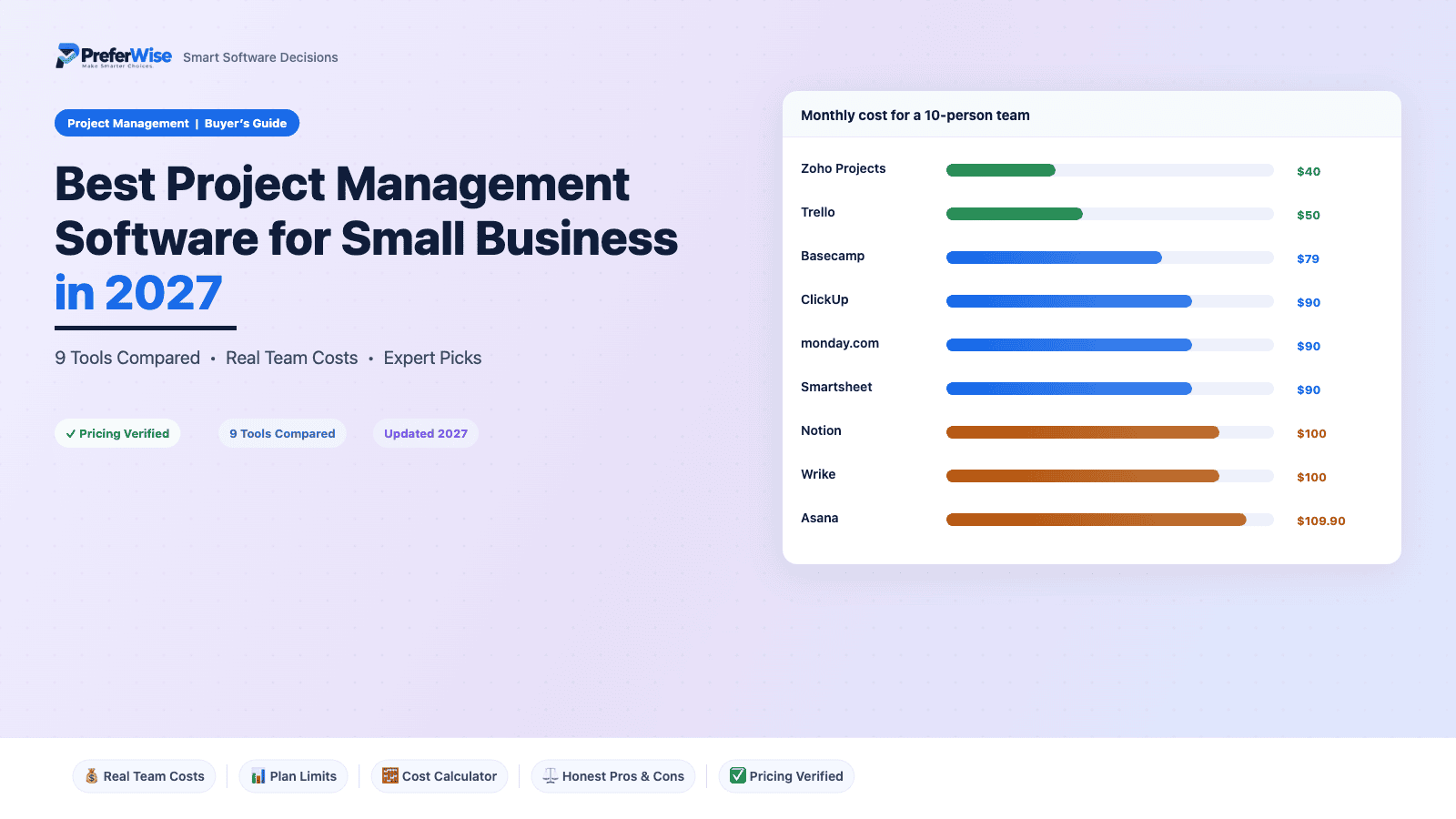
Per-user prices hide the real bill. This table totals each tool’s cheapest paid plan for 5, 10 and 25 people on annual billing. We highlight the cheapest in each column.
| Tool | 5 people / mo | 10 people / mo | 25 people / mo | Plan used |
|---|---|---|---|---|
| Trello | $25 | $50 | $125 | Standard |
| Zoho Projects | $20 | $40 | $100 | Premium |
| ClickUp | $45 | $90 | $225 | Core plan; list price $12 |
| monday.com | $45 | $90 | $225 | Basic plan; Gantt starts on Standard ($12) |
| Basecamp | $79 | $79 | $329 | Flat monthly rate shown on its page; $329 Pro Unlimited at 25 |
| Smartsheet | $45 | $90 | $475 | Pro to 10 members, Business at 25 |
| Asana | $54.95 | $109.90 | $274.75 | Starter; includes Gantt |
| Notion | $50 | $100 | $250 | Plus |
| Wrike | $50 | $100 | $625 | Team to 15 users, Business at 25 |
Cost calculator
Move the slider to your team size. The calculator shows each tool’s entry and growth plan, sorted from cheapest. For a wider view of how your stack adds up, try our price estimator.
| Tool | Entry plan / mo | Growth plan / mo | Entry plan / year |
|---|
USD, annual billing where the vendor offers it. Entry plans: ClickUp Core, monday.com Basic, Asana Starter, Trello Standard, Zoho Premium, Basecamp Pro (Pro Unlimited above 10 people), Notion Plus, Smartsheet Pro (Business above 10), Wrike Team (Business above 15). Growth plans: ClickUp Business, monday.com Standard, Asana Advanced, Trello Premium, Zoho Enterprise, Basecamp Pro Unlimited, Notion Business, Smartsheet Business, Wrike Business. Basecamp prices are the monthly rates shown on its pricing page, and annual discounts may apply. Basecamp also sells Pro Plus for up to 15 users; check its pricing page. Wrike sells seats in blocks, so real totals can run slightly higher.
The 9 Tools in Detail
1. ClickUp
BEST VALUE FOR FEATURESClickUp crams more into its $9 Core plan than rivals offer at double the price: unlimited storage, custom fields, forms, goals and 1,000 automation runs a month. Nobody calls it simple, though. Budget a few hours to shape your workspace before anyone else logs in.
Good
- Core already includes unlimited storage, custom fields, forms and goals
- Docs, chat and forms share one workspace, so you drop a tool or two
- Business adds resource management once workloads get uneven
Watch out
- The $9 and $17 prices sit below the $12 and $25 list prices ClickUp shows beside them, so check what renewal charges
- Free plan stops at 60 MB of storage; one batch of attachments fills it
- Teams that dislike configuring tools stall here
2. monday.com
BEST FOR VISUAL WORKFLOWSmonday.com wins people over fast: boards read clearly and non-technical staff need little training. The trap sits in the plan ladder. Basic lacks Gantt and guest access, so most small teams end up on Standard at $12 anyway.
Good
- Boards make sense at a glance, which cuts training time
- Standard adds Timeline, Gantt, calendar view and guest access
- Pro adds time tracking and private boards for teams that bill hours
Watch out
- Price Standard, not Basic; Basic works as a teaser for most teams
- Standard caps automation and integration actions at 250 each a month
- 10 seats on Pro cost $190 a month on annual billing
3. Asana
BEST FOR CLIENT-FACING TEAMSAsana Starter at $10.99 is the priciest entry plan here, and it earns that price in one situation: working with people outside your company. Unlimited free guests, timeline and Gantt views, forms and unlimited automations all come in the first paid plan. Advanced, at $24.99, is where portfolios, goals and resource management start.
Good
- Unlimited free guests suit client and contractor work
- Starter includes timeline, Gantt, forms and unlimited automations
- 100+ free integrations
Watch out
- Free plan covers 2 users, among the tightest caps on this list
- Starter limits AI to 5 requests per user a month; extra requests cost $0.50 each, prepaid
- Monthly billing adds $2.50 per user
4. Trello
EASIEST TO ADOPTTrello is a board with cards, and that is the whole pitch. A team that never used a project tool can start the same afternoon. Standard at $5 removes the free plan’s 10-board cap; Premium at $10 adds extra views and admin controls.
Good
- Cheapest big-name option at $5 per user
- Free plan covers 10 collaborators with unlimited cards
- Capture tasks straight from email, Slack and Teams
Watch out
- Dependencies and heavy reporting outgrow boards fast
- Views beyond boards sit behind Premium at $10
5. Zoho Projects
BEST BUDGET OPTIONZoho Projects costs $4 per user on annual billing, the lowest paid entry here. Premium also brings unlimited projects, 100 GB storage, budgets and timesheets, so service businesses that track hours get real value. Judge the interface in a trial before you commit.
Good
- Cheapest paid plan on this list
- Premium includes budgets, timesheets with approvals and task blueprints
- Free plan covers 5 users with 5 GB
Watch out
- Free plan stops at 3 projects
- Critical path and baselines need Enterprise
- Zoho shows local-currency prices; USD figures here come from pricing trackers, so check your region
6. Basecamp
BEST FLAT-FEE PRICINGBasecamp charges per account, not per person. Pro costs $79 a month for up to 10 users; Pro Unlimited costs $329 with no user cap. Messages, chat, to-dos and schedules share one project space, so it suits teams that want less tool and more conversation.
Good
- Flat billing: adding a person never changes your invoice
- Message boards, chat, card tables and templates in every project
- 30-day free trial on paid plans
Watch out
- Pro allows 8 active projects at a time (archived ones do not count)
- At 3 users, $79 works out to about $26 each
- No Gantt or dependency tooling on its pricing page
7. Notion
BEST FOR DOCS-HEAVY TEAMSNotion works as a project tool because you build it into one. Docs, wikis and task databases share one workspace, which suits teams that write constantly: briefs, SOPs, meeting notes. Nothing ships with project structure, so someone has to own the setup.
Good
- Docs, wiki and task databases in one workspace
- Plus removes upload limits and adds unlimited guests and 30-day page history
- Templates cover lightweight project tracking
Watch out
- No native Gantt or workload view
- Teams without a champion end up with scattered pages
- Private teamspaces need Business at $20
8. Smartsheet
BEST FOR SPREADSHEET-DRIVEN OPSSmartsheet reads like a spreadsheet that learned project management, which suits ops, finance and facilities teams. Pricing carries a cliff: Pro covers 1 to 10 members, and the 11th forces Business. Contributors cost nothing on any plan.
Good
- Grid layout feels familiar to anyone who lives in spreadsheets
- Contributors are free on every plan
- AI features come with Pro
Watch out
- No free plan
- Member 11 pushes the bill from $90 to $209 a month, a $119 jump for one hire
- Pro has no API and caps automated triggers at 250 a month, storage at 20 GB and files at 30 MB
9. Wrike
BEST FOR TEAMS GROWING PAST 15Wrike makes sense for teams that expect to outgrow smaller tools. Team costs $10 per user for 2 to 15 users and includes Gantt charts and shareable dashboards. Business at $25 adds request forms, proofing, approvals and time tracking, but sells annually only, with a 5-user minimum.
Good
- Team includes Gantt and shareable dashboards at $10
- Connects with Google Workspace, Microsoft 365 and Slack
- Scales to hundreds of users without a platform switch
Watch out
- Team stops at 15 users; user 16 triggers Business at $25
- Business carries a 5-user minimum, about $1,500 a year
- Team allows only 50 automation actions per user a month
For the full cost breakdown across 10 tools, including monthly billing premiums and hidden limits, read our project management software pricing guide.
How to Choose
Match your situation to the tool, then check the user cap before you buy.
You run a team of 2 to 5 on a tight budget
Start with Trello Standard ($5) or Zoho Projects Premium ($4). At 5 users, that costs $25 and $20 a month. Choose Trello for boards and Zoho for budgets and timesheets.
You work with clients, freelancers or contractors
Choose Asana Starter for unlimited free guests with timeline views, or monday.com Standard for guest access in a more visual workspace. Basecamp works if you prefer conversation over task grids.
Your team writes more than it tracks
Notion Plus ($10) keeps briefs, SOPs and tasks together. Add a PM-first tool later if schedules and dependencies matter.
You expect to double in size within two years
Compare ClickUp Business ($17), Asana Advanced ($24.99) and Wrike. Wrike Team stops at 15 users; Smartsheet Pro stops at 10 members. Check caps before you commit.
Your team lives in spreadsheets
Smartsheet Pro ($9) fits operations, finance and facilities teams of up to 10 members. Budget for the move to Business ($19) when you add the 11th.
You hate per-seat pricing
Basecamp Pro at $79 a month covers 10 people. Beyond 10, check Pro Plus on Basecamp’s pricing page, and compare against per-seat plans before committing to Pro Unlimited at $329.
Still stuck between the two most popular picks? ClickUp vs Asana breaks down price, free plans and where each tool wins.
Three Costly Mistakes
Pricing the plan you will not use. monday.com Basic at $9 looks cheap, but it lacks Gantt and guest access. Asana Starter at $10.99 includes both. Compare plans against the features you need, not the headline price.
Ignoring the cliff. One hire moves Smartsheet from $90 to $209 a month. Wrike Team ends at 15 users. Check each cap against next year’s headcount.
Paying monthly by default. Monthly billing adds $1 per user on Trello Standard, $2 on Notion Plus and Wrike Team, $2.50 on Asana Starter and $3 on Smartsheet Pro. Commit to annual only after a trial passes.
Frequently Asked Questions
Sources
- monday.com pricing (vendor page, read November 2026)
- ClickUp pricing (vendor page, read November 2026)
- Asana pricing (vendor page, read November 2026)
- Trello pricing (vendor page, read November 2026)
- Basecamp pricing (vendor page, read November 2026)
- Zoho Projects pricing tracker (USD prices, verified October 2026)
- Notion pricing tracker (prices read October 2026)
- Smartsheet pricing tracker (verified October 2026)
- Wrike pricing tracker (verified May 2026; Wrike changed top-tier pricing in February 2026)
Prices change frequently. Confirm the current price on each vendor’s site before you buy.
