
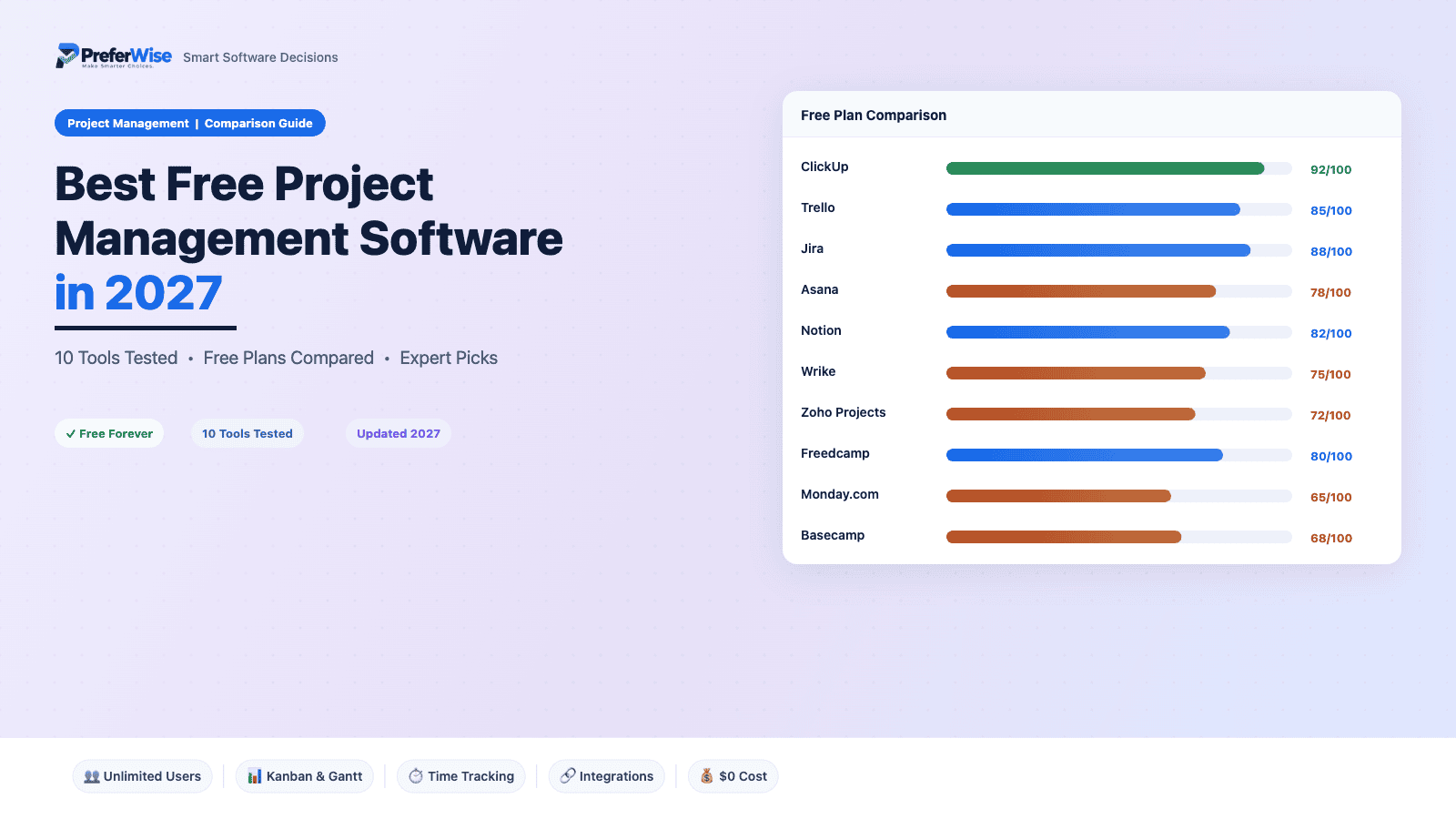
Best Free Project Management Software in 2027
We tested the free plans of 10 popular project management tools — tracking their actual limits, hidden restrictions, and real-world usability. Here’s what you actually get without paying a cent.
Last updated: January 2027 · Written by the PreferWise research team
The Quick Answer
If you need one recommendation: ClickUp offers the most feature-rich free plan with unlimited users and tasks — though its 60MB storage cap means you’ll want to keep files elsewhere. For simple boards, Trello is unbeatable. For dev teams, Jira gives you full Agile tooling for up to 10 people.
- Free Plan Comparison Table
- ClickUp — Best Overall
- Trello — Best for Simple Kanban
- Jira — Best for Agile Teams
- Asana — Best for Integrations
- Notion — Best for Solo Productivity
- Wrike — Best for Unlimited Users
- Zoho Projects — Best for Small Business
- Freedcamp — Most Generous Free Plan
- Monday.com — Best for Beginners
- Basecamp — Best for Team Chat + Tasks
- Free Plan Scorecard
- How to Choose
- FAQ
Free Plan Comparison at a Glance
Before diving into the details, here’s every free plan side-by-side. Use the search box or filters to narrow things down.
| Tool | Free Users | Storage | Projects / Boards | Key Free Features | Biggest Limitation |
|---|---|---|---|---|---|
| ClickUp | Unlimited | 60 MB total | Unlimited tasks, 5 Spaces | Docs, Whiteboards, Sprints, Kanban, Calendar, Gantt (60 uses) | 60 MB storage cap |
| Trello | 10 | 10 MB/file | 10 boards, unlimited cards | Unlimited Power-Ups, 250 automations/mo, Board view | 10 boards only, Board view only |
| Jira | 10 | 2 GB | Unlimited projects & tasks | Scrum + Kanban, Backlog, Timeline, 150 automations/mo | 10-user cap, complex UI |
| Asana | 2 | Unlimited (100 MB/file) | Unlimited projects & tasks | List, Board, Calendar views; 100+ integrations | Only 2 users |
| Notion | 1 | 5 MB/file | Unlimited pages & databases | Docs + databases + wikis + Kanban in one; templates | Solo use only |
| Wrike | Unlimited | 2 GB | 200 active tasks, 1 space | Gantt, Board, Table views; REST API; folder hierarchy | 200 active task limit |
| Zoho Projects | 5 | 5 GB | 3 projects | Gantt, issue tracker, milestones, subtasks | 3-project limit |
| Freedcamp | Unlimited | Unlimited (10 MB/file) | Unlimited | Time tracking, discussions, milestones, calendar | Dated UI, limited integrations |
| Monday.com | 2 | Not stated | 3 boards (1,000 items) | 200+ templates, Docs, embedded forms | 2 seats, 3 boards, no automations |
| Basecamp | 5 | 1 GB | 1 project | To-dos, chat, message boards, Hill Charts, scheduling | 1 project only |
1. ClickUp
BEST OVERALLClickUp packs more features into its free plan than most competitors include in their paid tiers. Unlimited users, unlimited tasks, Docs, Whiteboards, Sprints — it’s all there. The catch? A laughably low 60 MB storage cap that’ll fill up after a handful of PDFs.
What’s Good
- Most features of any free PM plan — Docs, Whiteboards, Sprints, Goals all included
- Unlimited users and unlimited tasks with no time limit
- Multiple views: List, Board, Calendar, and limited Gantt (60 uses)
- Built-in Docs and Whiteboards reduce the need for separate tools
- Strong mobile apps on iOS and Android
What’s Missing
- 60 MB total storage is shockingly low — you’ll run out immediately if sharing files
- Gantt view limited to 60 uses (then locked until you upgrade)
- No time tracking on free plan
- Guest permissions can’t be restricted — guests get full edit access
- Custom fields cap out at 100 uses
- No private Spaces
2. Trello
BEST FOR SIMPLE KANBANTrello practically invented the digital Kanban board, and its free plan remains one of the most intuitive entry points into project management. Drag cards between columns, assign team members, set due dates — it’s simple, visual, and works out of the box with zero learning curve.
What’s Good
- The simplest, most intuitive PM tool — anyone can learn it in minutes
- Unlimited Power-Ups (integrations) on the free plan
- 250 automation runs per month with Butler
- Unlimited cards within each board
- 10 collaborators is generous for small teams
- Excellent mobile experience
What’s Missing
- 10-board cap is the biggest pain point — multi-project teams will hit it fast
- Only Board view on free — no Calendar, Timeline, Table, or Dashboard
- 10 MB file attachment limit per file
- No custom fields (Premium feature)
- Limited for complex projects — no dependencies, milestones, or subtasks beyond checklists
3. Jira
BEST FOR AGILE & DEV TEAMSJira is the gold standard for software development teams practicing Agile. Its free plan includes full Scrum and Kanban boards, backlog management, sprint planning, and agile reporting — features that other tools gate behind expensive tiers. The trade-off is a strict 10-user cap and a learning curve that can intimidate non-technical teams.
What’s Good
- Full Scrum and Kanban boards with backlog management
- Timeline view (Gantt-like) included on free
- 2 GB storage — more generous than most free plans
- Unlimited projects, tasks, goals, and forms
- 150 automation steps/month
- Agile reporting and velocity charts
- Integrates natively with Confluence, Bitbucket, and the Atlassian ecosystem
What’s Missing
- Hard 10-user cap with no workaround
- Steep learning curve for non-developers
- No advanced roadmaps, release management, or audit logs
- No user roles/permissions on free — everyone is an admin
- Community-only support
4. Asana
BEST FOR INTEGRATIONSAsana’s Personal plan offers unlimited tasks, unlimited projects, and over 100 integrations — making it excellent for individuals who need their PM tool to connect with everything. The 2-user limit is the harshest in this roundup, though, so this is really a solo tool with the option to bring in one collaborator.
What’s Good
- Unlimited storage with generous 100 MB per-file limit
- 100+ integrations on free — connects to Slack, Gmail, Microsoft Teams, and more
- Clean, polished interface with a gentle learning curve
- Three views (List, Board, Calendar) on free
- Unlimited tasks and projects
- Status updates included for project visibility
What’s Missing
- Only 2 users — the most restrictive team cap among popular tools
- No Timeline/Gantt view (Starter tier feature)
- No custom fields, forms, or workflow automations
- No reporting dashboards
- No custom templates
5. Notion
BEST FOR SOLO PRODUCTIVITYNotion isn’t a traditional PM tool — it’s an all-in-one workspace where databases, wikis, notes, and task boards coexist in a single flexible interface. For solo users who want project management, knowledge management, and documentation in one place, nothing else comes close on a free plan.
What’s Good
- Unlimited pages and blocks — no content limits
- Incredibly flexible: databases, kanban boards, calendars, wikis, and docs all in one
- Rich template ecosystem with thousands of free templates
- Databases with multiple views (Table, Board, Calendar, Gallery, Timeline)
- API access for custom integrations
- Invite up to 10 guests for read access
What’s Missing
- Solo use only — no team collaboration on free
- 5 MB file upload limit is restrictive
- 7-day page history (30 days on Plus)
- No bulk export on free
- Basic integrations only — Slack, Google Drive etc. require paid
- Steeper learning curve due to extreme flexibility
6. Wrike
BEST FOR UNLIMITED USERSWrike is one of the few enterprise-grade PM tools that offers unlimited users on its free plan — a major draw for larger teams on a tight budget. The trade-off is a 200 active task limit that can feel restrictive, but for teams with straightforward project needs and many collaborators, it’s a compelling option.
What’s Good
- Unlimited users is rare and valuable — invite your entire team at no cost
- Gantt chart view included on free (most competitors lock this behind paid)
- Folder and subfolder hierarchy for organized project structure
- REST API access for custom integrations
- Cloud storage integrations (Google Drive, Dropbox, Box, OneDrive)
- 2 GB storage is respectable
What’s Missing
- 200 active task limit will bottleneck active projects quickly
- Only 1 shared space
- No dashboards, custom fields, request forms, or time tracking
- No workflow automations on free
- Native integrations (beyond cloud storage) require paid plans
7. Zoho Projects
BEST FOR SMALL BUSINESSZoho Projects is the quiet overachiever in this list. Its free plan supports 5 users with 5 GB storage, Gantt charts, an issue tracker, and milestones — a combination that makes it surprisingly capable for small business teams. It also plugs neatly into Zoho’s wider ecosystem (CRM, Books, Desk) if you’re already there.
What’s Good
- 5 users + 5 GB storage is generous for a free plan
- Gantt charts and milestone tracking included at no cost
- Built-in issue/bug tracker — useful for product teams
- Integrates with Google Apps and Office 365 on free
- Part of the Zoho ecosystem (CRM, invoicing, support desk)
- Cheapest upgrade path: Premium starts at just $4/user/mo
What’s Missing
- 3-project limit restricts multi-project teams
- Limited workflow automation on free
- Mobile app is less polished than desktop
- Broader Zoho integrations (Zoho CRM, Slack, etc.) require paid plan
- UI feels functional rather than modern
8. Freedcamp
MOST GENEROUS FREE PLANFreedcamp has the most generous free plan in the project management space — unlimited users, unlimited projects, unlimited storage, and even free time tracking. It’s the closest thing to a fully free PM tool that exists. The trade-off is an older interface and a smaller ecosystem compared to the big names.
What’s Good
- Truly unlimited: users, projects, tasks, and storage at no cost
- Free time tracking — rare among competitors
- Discussion boards for team communication
- Milestones and calendar views included
- Password manager included (basic)
- No credit card required, no trial period — genuinely free forever
What’s Missing
- Dated interface — feels several years behind modern tools
- 10 MB per-file upload limit
- Gantt charts, CRM, invoicing, and issue tracker are paid add-ons
- Smaller community means fewer templates and integrations
- Mobile app is less polished
- No AI features
9. Monday.com
BEST FOR BEGINNERSMonday.com’s colorful, spreadsheet-like interface makes it one of the most approachable PM tools for newcomers. But the free plan is severely limited — 2 seats, 3 boards, and no automations or integrations. It’s more of a “try before you buy” experience than a permanent free solution.
What’s Good
- Beautiful, intuitive interface that’s easy to learn
- 200+ templates to get started quickly
- Unlimited Docs on free plan
- Embedded forms for intake workflows
- Strong mobile apps
What’s Missing
- Only 2 seats — can’t add team members
- 3 boards with 1,000-item cap
- No Timeline, Gantt, Calendar, or Dashboard views
- No integrations whatsoever on free
- No automations
- No guest access
10. Basecamp
BEST FOR TEAM CHAT + TASKSBasecamp takes a deliberately different approach — it combines project management with team messaging, document sharing, and scheduling in one opinionated package. No Gantt charts, no dependencies, no custom fields. Just to-dos, conversations, and Hill Charts to track progress. Its free plan is limited to 1 project, making it more of a taster than a tool you’d build a business around.
What’s Good
- All-in-one project hub: tasks, chat, docs, and scheduling in one place
- Built-in team messaging (Campfire) eliminates the need for Slack
- Hill Charts for unique visual progress tracking
- Clean, distraction-free design philosophy
- No credit card required
What’s Missing
- Only 1 project on free — severely limits practical use
- 1 GB storage fills up quickly
- No Gantt charts, dependencies, or timeline views
- No automations or custom workflows
- Paid plan is expensive ($15/user/mo or $299/mo flat)
Free Plan Scorecard: Which Tool Gives You the Most?
Not all free plans are created equal. We scored each tool’s free tier on five factors — user capacity, storage generosity, feature breadth, views/flexibility, and upgrade value — to rank how much you actually get for free.
How to Choose the Right Free PM Tool
The “best” free PM tool depends entirely on your situation. Here’s a decision framework based on the most common scenarios we see:
You’re a solo freelancer or consultant
You’re a small team (2–5 people)
- First choice: Zoho Projects — 5 users, 5 GB, Gantt charts, issue tracking at $0
- Alternative: Trello — if your workflow is Kanban-based and simple
- Alternative: ClickUp — if you need unlimited users and advanced features
You’re a software development team (up to 10 devs)
You’re a large team on a zero budget
You just need simple task boards
- First choice: Trello — the easiest Kanban tool with the fastest setup
- Alternative: Monday.com — if you want a visually polished UI (but accept the 3-board limit)
Free plans work until your team grows or your files fill the storage cap. When that happens, our project management software pricing guide shows what 10 tools cost for 5 to 50 people, and ClickUp vs Asana compares two of the most common upgrades head to head.
